Screw Drivers Wiki
Builds, gear guides, and monarch walkthroughs for every driver.
The unofficial Screw Drivers wiki with vehicle builds, gear guides, parts catalog, monarch strategies, and multiplayer tips.
- 6,300+
- Steam reviews
- 86%
- Positive rating
- Online
- Multiplayer
- v1.0
- Full release
Every hub you need, organized by what players search for most.
Guides Hub
Every Screw Drivers guide in one place: beginner tutorials, gear mechanics, vehicle building tips, and career mode.
Read guide BuildsBuilds Hub
Vehicle build guides for Screw Drivers: beginner chassis designs, high-speed racers, transmission setups, and optimized.
Read guide ControlsControls Hub
Master every input in Screw Drivers. Full keyboard and controller reference for build mode, driving, and camera.
Read guide PartsParts Hub
Explore every part in Screw Drivers. Engines, wheels, gears, suspension, beams, and special components explained with.
Read guide MonarchsMonarchs Hub
Complete Screw Drivers monarch boss guide: strategies for Prince of Gears, Combustion King, Queen of Quickening, King.
Read guide MultiplayerMultiplayer Hub
Screw Drivers multiplayer guide: dedicated server setup, port forwarding, performance tips, ghost mode, and everything.
Read guide MapMap Hub
Screw Drivers island map guide: hidden treasures, paint colors, exploration tips, starting locations, and everything.
Read guide UpdatesUpdates Hub
Screw Drivers update history and roadmap: v1.0 full release, multiplayer return, chains, gears, new islands.
Read guideDeep, beginner-friendly walkthroughs for common questions.
Beginner Builds
Learn to build your first vehicle in Screw Drivers. Starter chassis designs, recommended parts, common mistakes, and a.
Read guide ControlsKeyboard Controls
Complete keyboard control reference for Screw Drivers. Build mode shortcuts, driving keybinds, camera controls, and.
Read guide GuidesGetting Started
Learn how to build your first vehicle in Screw Drivers: place a chassis, attach an engine, connect gears and axles, add.
Read guide MapTreasure Locations
Every hidden treasure chest location in Screw Drivers. Career mode only, chest icons on map during free run, creative.
Read guide MonarchsPrince of Gears
How to beat the Prince of Gears in Screw Drivers. Starter car strategies, recommended builds with Electrix-180 and.
Read guide MultiplayerServer Setup Guide
How to set up a Screw Drivers dedicated server. Port forwarding, Windows Firewall configuration, server files, inviting.
Read guide PartsEngines
Complete engine catalog for Screw Drivers. Electric and combustion engines compared, accessories like turbo and.
Read guide BuildsSpeed Builds
High-performance vehicle builds for Screw Drivers: multi-engine setups, racing wheels, turbo integration, optimized.
Read guide GuidesGear Transmissions
Master gear transmissions in Screw Drivers: learn 2-step and 3-step gear shifts, planetary gear ratios, how to build.
Read guideNew to Screw Drivers? Follow these steps to get started fast.
- 1
Learn the build editor
Open the build editor and place your first chassis. Add an engine, connect axles and gears, then attach wheels and suspension. Test one component at a time so you understand what each part does. Our [Getting Started](/guides/getting-started/) guide walks through every step.
- 2
Master gear transmissions
Gears are the heart of every fast vehicle. Combine 2-step and 3-step gear shifts to create multi-speed transmissions. Avoid duplicate gear ratios to maximize the number of unique gears. Read the [Gear Transmissions](/guides/gear-transmissions/) guide for detailed ratio tables.
- 3
Challenge the Monarchs
Career mode pits you against five Monarchs, each with unique vehicles. Beat the Prince of Gears first, then work your way up to the Secret Queen. Unlock new parts after each victory. See our [Monarchs](/monarchs/) hub for boss strategies.
- 4
Race in multiplayer
Set up a dedicated server and invite friends to race. Forward UDP ports 8766, 38011, and 38012 on your router. Check the [Server Setup](/multiplayer/server-setup/) guide for step-by-step instructions.
- 5
Collect hidden treasures
Hidden treasures and colors spawn across the island in career mode. Use the map icons during free run to locate them. Some require creative vehicle designs to reach. Visit the [Treasure Locations](/map/treasure-locations/) page for all known spots.
Wiki FAQ
Quick answers to the most common questions.
What is Screw Drivers?
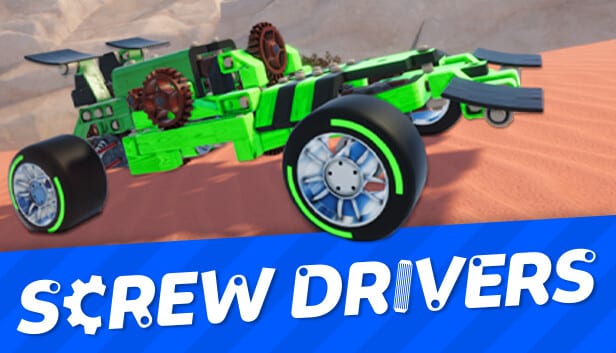
Screw Drivers is a physics-based vehicle building and racing game by Creactstudios, published by Headup Games on Steam. You design custom drivetrains using engines, gears, axles, and suspension, then race against AI Monarchs or compete in multiplayer.
Is Screw Drivers free to play?
Screw Drivers was free during Early Access but became a paid game on August 20, 2026. Check the [Steam store page](https://store.steampowered.com/app/1279510/Screw_Drivers/) for current pricing.
How do I fix the 'car has errors' message?
Press X in build mode to highlight disconnected parts in red. Usually a part is not connected to the chassis or an axle is missing. Return to build mode and check that all gears, axles, and wheels are properly attached. See the [Troubleshooting](/guides/troubleshooting/) guide for more fixes.
How do I unlock new parts in the tech tree?
Complete challenges and races with vehicles that meet specific requirements. Note that the displayed unlock conditions can be buggy — the actual conditions often differ from the text. Try completing races with the required part installed. See our [Parts](/parts/) hub for details.
How do I make my car steer?
Enable steering on the suspension, not the wheel. Select the suspension part in build mode and toggle the steering option in its configuration menu. This is a common source of confusion for new players.
Does Screw Drivers have a track editor?
Yes. The v1.0 full release on August 20, 2026 added a track editor that lets you build custom maps with terrain, ramps, decorations, and checkpoints. Tracks can be shared through the Steam Workshop. See the [Track Editor Guide](/guides/track-editor/) for details.
Which languages are supported?
This wiki is available in English, Français, Deutsch, Español, Português (BR), 日本語, and 한국어. The game itself shipped 25 languages at the v1.0 launch on August 20, 2026.